Free Floral PS Brushes
Resource Details
- Author
- Deseeg
- Format
- ABR
- Size
- 5.2 MB
- Opens in
- Photoshop, GIMP
- Imports into
- Procreate, Affinity Photo, KritaShapes import. Dynamics may not.
- Brush type
- Stamp brushes
- Items in set
- 14
- Downloads
- 61.6k
- Added
- Aug 23, 2013
Description
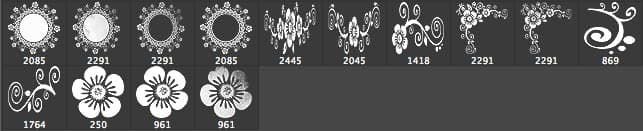
A nice pack of 14 brushes for Adobe Photoshop, made by Deseeg. Some of the floral brushes have grunge touches, giving them a worn, textured feel that works well for vintage-style designs and mixed-media compositions.
What's in the pack:
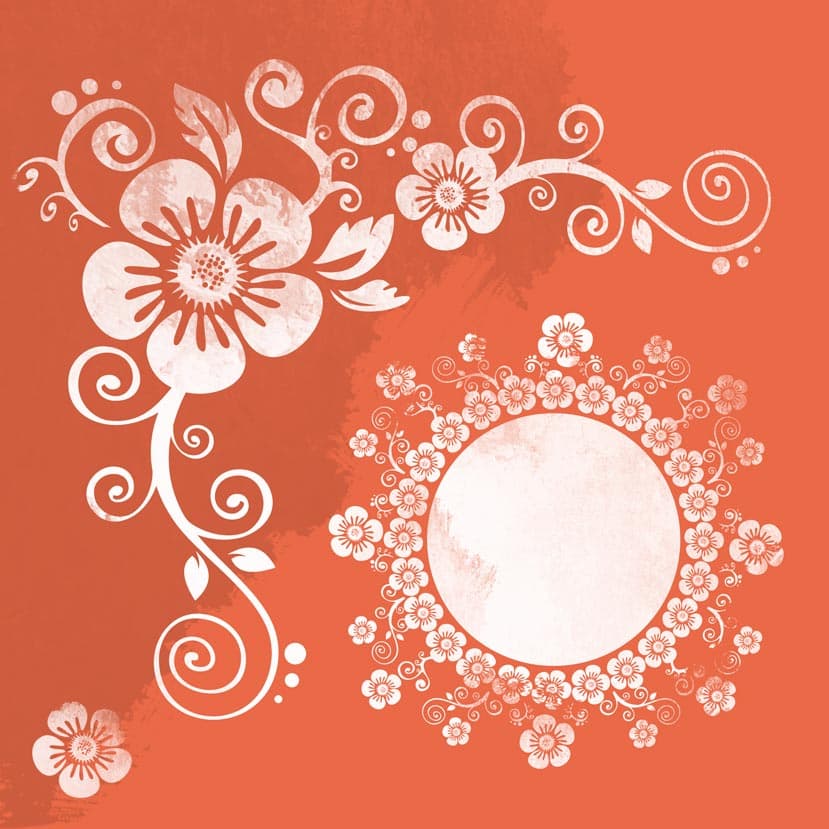
- 4 circular floral wreath frames: small cherry-blossom clusters arranged into rings with an open center, ready for type or a logo
- 2 horizontal floral garlands: long borders for top-of-page banners or invitation edges
- 3 corner ornament brushes built around a large five-petal flower with leaves, smaller blossoms and trailing spirals
- 2 standalone decorative scrolls: pure swirls and curls, no flowers
- 3 single five-petal flower stamps in different sizes, useful as accents or scattered fill
Brush sizes run up to 2445 pixels, so these hold up at print scale (wedding invitations, product labels, posters) without going soft. The grunge texture in the white fill is built into the brush itself, which gives every stamp that slightly inky, hand-pressed quality on the first click rather than something you'd have to fake with overlays.
Style-wise the set leans ornamental and slightly folk, somewhere between vintage stationery and contemporary boho. Reach for it on wedding suites, artisan packaging, feminine branding, greeting cards, or anywhere a layout needs softening without going twee.
Free download, ABR format, works in Photoshop.
What's Included