Dave's Brushes
Resource Details
- Format
- ABR
- Size
- 394 KB
- Opens in
- Photoshop, GIMP
- Imports into
- Procreate, Affinity Photo, KritaShapes import fine. The Photoshop dynamics do not.
- Brush type
- Dynamic brushes
- Items in set
- 9
- Downloads
- 15.9k
- Added
- Oct 1, 2013
LicenseCommercial
Learn morePreparing...
Description
Use them as much as you want, consider them a gift for you all wonderful people. If you want to credit me too, then go ahead, that would be lovely c:
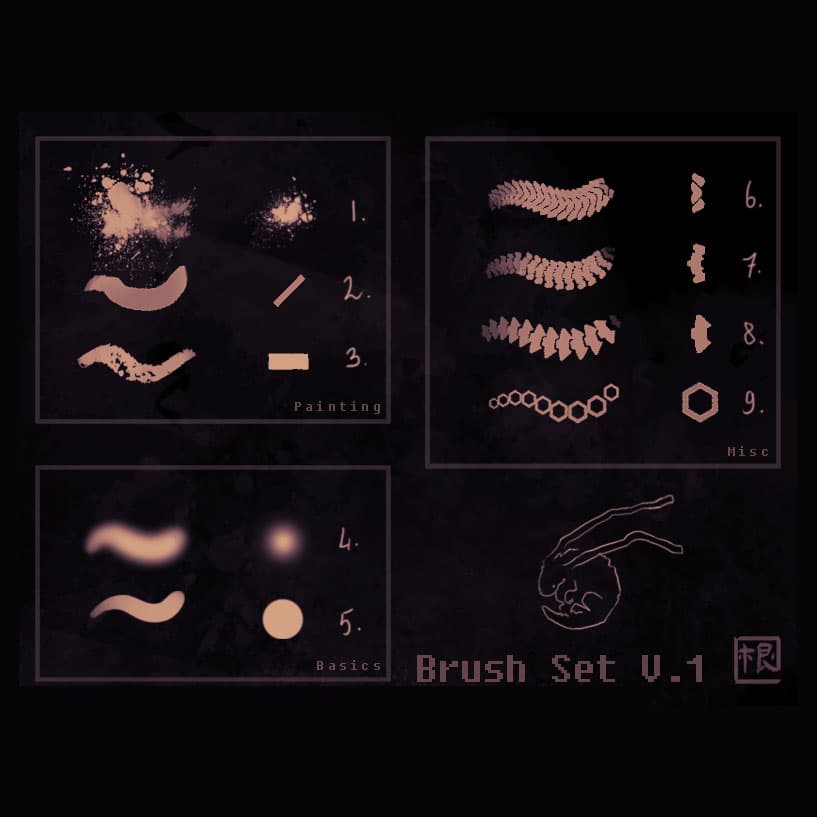
So here are some infos about the brushes: I divided them in 3 categories, to better explain how they should be used:
-Painting brushes (These are the 'big' ones, it's what I use 90% of the times). Sometimes playing with the 'wet edges' option might make things better, depending on the situation. Default is on.
- Splashy brush, I use this for merging and texturing at the same time. Also, great for clouds!
- My main painting brush. <3 I LOVE THIS THING SO MUCH OMG ;u;
- My 2nd most used brush, I use it for texturing too. I love it at mid-low opacity
-Basic brushes These are just super simple circular brushes, not much to say about these (:
- Circular soft brush. I do NOT use this for shading! I use this mostly for lights and gradients, nothing more!
- Circular solid brush, nice for general lining or if you need a strong brush stroke without anything fancy
-Misc brushes Some experiments that ended up kinda cool XD
-
-
- These are just fun brushes I made to sketch super basic structure in my sci-fi stuff. You don't really see them in my finished works, because they just give an idea of how things will look like once I'm done with detailing.
-
- Hexagons. Just hold shift and swipe horizontally and you'll have a nice and clean hexagons trail. Again, I use it for my sci-fi paintings (:
What's Included

Frequently asked questions
Is "Dave's Brushes" free to download?
Yes, this resource is free to download from MyPhotoshopBrushes, with no signup and no paywall. It is published under the Free for Commercial Use license, which allows commercial use. See the license panel on this page for the exact terms.
What file format does this download use?
The download is a ZIP archive containing .ABR files. Unzip it first, then use the files inside.
How do I use it in Photoshop?
Download the .ABR file and double-click it. Photoshop imports the set and appends it to the Brushes panel automatically. You can also drag the file onto the Photoshop window, or open Window → Brushes and choose Import Brushes from the panel menu.